In addition to the Forms Boss subscription, you must maintain an active ACORD end-user license.

Forms Boss Desktop - Email Setup Guide

These are the steps to set up your Forms Boss Plus email.
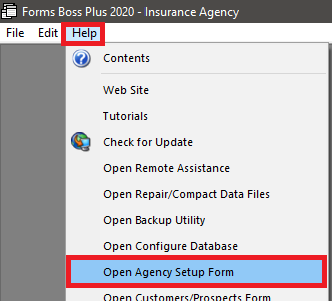
Open Forms Boss Plus.
Click Help, Open Agency Setup Form.

Email Setup step 1

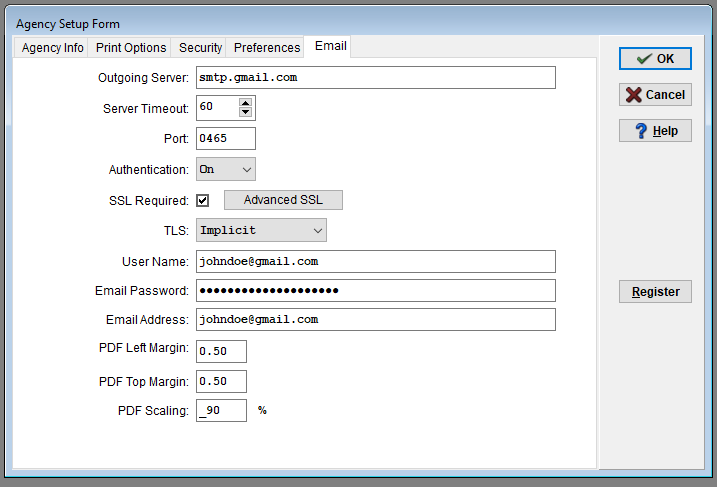
Click the Email tab.
Enter your email settings that your email hosting service has provided and click OK.
Below you will find some popular email hosting service settings.

Email Setup step 2

    AIM
  • Outgoing/SMTP Server: smtp.aim.com
  • Port: 0587
  • SSL required: Checked
  • TLS: None
  • Authentication Type: On
  • Account Name/User Name: Your AIM email address
  • Email Password: Your AIM email password
  • Your Email Address: Your AIM email address
    AOL
  • Outgoing/SMTP Server: smtp.aol.com
  • Port: 0587
  • SSL required: Checked
  • TLS: Explicit
  • Authentication Type: On
  • Account Name/User Name: Your AOL email address
  • Email Password: Your AOL email password
  • Your Email Address: Your AOL email address
    Farmers Insurance
  • Outgoing/SMTP Server: smtp.postoffice.net
  • Port: 0587
  • SSL required: Checked
  • TLS: Explicit
  • Authentication Type: On
  • Account Name/User Name: Your Farmers email address
  • Email Password: Your Farmers email password
  • Your Email Address: Your Farmers email address
    GMail
  • Outgoing/SMTP Server: smtp.gmail.com
  • Port: 0465
  • SSL required: Checked
  • TLS: Implicit
  • Authentication Type: On
  • Account Name/User Name: Your Gmail email address
  • Email Password: Your GMail email password
  • Your Email Address: Your GMail email address
  • Note: You may get an error even though all of your email settings are correct in Forms Boss. Visit https://myaccount.google.com/security and for "Less secure app access" set it to "On"
  • Note: If you do not see the option for "Less secure app access", then you may need to create an app specific password: https://support.google.com/accounts/answer/185833?hl=en
    GoDaddy
  • Outgoing/SMTP Server: smtpout.secureserver.net
  • Port: 0465 (25, 80, or 3535)
  • SSL required: Checked
  • TLS: Implicit
  • Authentication Type: On
  • Account Name/User Name: Your email address
  • Email Password: Your email password
  • Your Email Address: Your email address
    GoDaddy (Office 365 Exchange)
  • Outgoing/SMTP Server: smtp.office365.com
  • Port: 0587 (25, 80, or 3535)
  • SSL required: Checked
  • TLS: Explicit
  • Authentication Type: On
  • Account Name/User Name: Your email address
  • Email Password: Your email password
  • Your Email Address: Your email address
  • Note: You may have to click Advanced SSL and only check TLS v1.2
    Hotmail and Windows Live
  • Outgoing/SMTP Server: smtp.live.com
  • Port: 0587
  • SSL required: Checked
  • TLS: Explicit
  • Authentication Type: On
  • Account Name/User Name: Your Hotmail or Windows Live email address
  • Email Password: Your Hotmail or Windows Live email password
  • Your Email Address: Your Hotmail or Windows Live email address
    Yahoo Mail
  • Outgoing/SMTP Server: smtp.mail.yahoo.com
  • Port: 0465
  • SSL required: Checked
  • TLS: Implicit
  • Authentication Type: On
  • Account Name/User Name: Your Yahoo email address
  • Email Password: Your Yahoo email password
  • Your Email Address: Your Yahoo email address