Skip to main content
In addition to the Forms Boss subscription, you must maintain an active ACORD end-user license.
Forms Boss Desktop - Signature Guide
These are the steps to set up a Forms Boss Plus producer signature on ACORD forms.
-
Open Forms Boss Plus
-
Click Help, View Main Menu.
-
Click the Management tab.
-
Double-click the Sales Rep Form.
-
Enter your Name in the boxes provided.
-
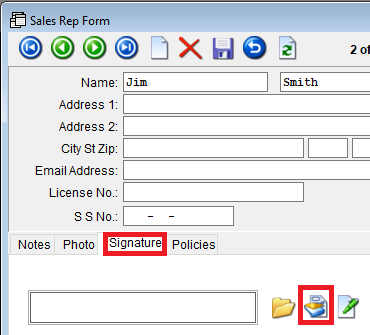
Click the Signature tab.
-
Click the scanner button.
-
Wait for your list of devices to appear as it can take several seconds.
-
Choose your scanner and click the OK button.
-
Sign a piece of paper
-
Insert your signed paper into the scanner.
-
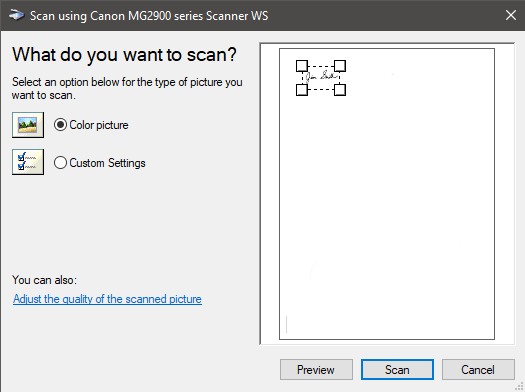
Click the Preview button.
-
After the paper has been scanned and previewed, use your mouse to resize the selection.
-
Click the Scan button.
-
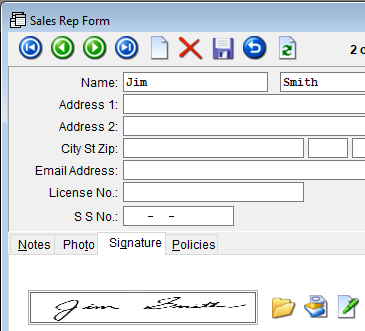
After the scan, the scanner dialog should disappear and the signature should appear in the Sales Rep Form.
-
Close the Sales Rep Form.
-
Open an ACORD that needs to be signed.
-
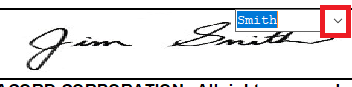
Click the arrow in the producer signature area and left click your signature.