Skip to main content
In addition to the Forms Boss subscription, you must maintain an active ACORD end-user license.
Forms Boss Desktop - Restore Guide
These are the steps to restoring your Forms Boss Plus data from a flash drive.
Important Notes
-
Close the program on all systems.
-
Plug in the flash drive. Windows should assign it a drive letter such as G:
Open the Forms Boss Backup Utility.
-
Click Start.
-
Scroll to the Forms Boss Plus folder and click it..
-
Click Forms Boss Backup

Use these steps to complete the restore.
-
When the Forms Boss Backup has opened, click the Restore button.

-
In the "Open" dialog, choose your flash drive on the left under "This PC".
-
Choose your zip backup file on the right.
-
Click the Open button

-
Click the "Yes to all" button when prompted.
-
You will be notified when the restore is complete.
-
Click OK.
-
Close the Forms Boss Backup using the X button in the upper right corner of the window.
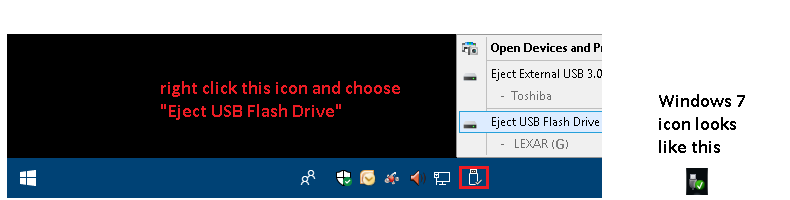
Safely eject the flash drive.
-
Right-click the tray icon like in the picture and choose to eject the flash drive..